FastSAM 模型 TensorRT 部署
本地环境:
- Windows 11
- RTX 2060 Super
- CUDA12.4
- TensorRT8.6.1
- OpenCV4.8
1、FastSAM 模型转换
1.1、创建 Anaconda 虚拟环境
conda create -n env-fastsam python=3.10
conda activate env-fastsam
安装 ultralytics
pip install -U ultralytics安装 pytorch
pip3 install torch torchvision --index-url https://download.pytorch.org/whl/cu126安装 onnxruntime
pip install onnxruntime -i https://pypi.tuna.tsinghua.edu.cn/simple1.2、转换模型
下载 FastSAM-x.pt 文件
https://huggingface.co/Uminosachi/FastSAM/blob/main/FastSAM-x.pt
# 方法A:使用 yolo 命令(推荐)
yolo export model=weights/FastSAM-x.pt format=onnx imgsz=1024 opset=12
对于静态模型,直接使用最简单命令:
trtexec --onnx=weights\FastSAM-x.onnx --saveEngine=weights\FastSAM-x.engine --fp16 --device=01.3、测试 engine
from ultralytics import FastSAM
import time
import cv2

def main():
    # 配置路径
    ENGINE_PATH = 'D:/Harrytsz-Test/Harrytsz-FastSAM/weights/FastSAM-x.engine'
    IMAGE_PATH = 'D:/Harrytsz-Test/Harrytsz-FastSAM/images/cat.jpg'
    OUTPUT_PATH = './outputs/result.jpg'

    # 加载模型
    print("Loading TensorRT engine...")
    model = FastSAM(ENGINE_PATH)

    # 预热模型(关键:必须指定imgsz)
    print("Warming up...")
    model(IMAGE_PATH, imgsz=1024)  # 第一次推理会稍慢

    # 正式推理
    print("Inference...")
    start = time.time()
    results = model(
        IMAGE_PATH,
        imgsz=1024,  # ✅ 必须指定
        conf=0.4,
        iou=0.9,
        retina_masks=True
    )
    infer_time = (time.time() - start) * 1000
    # 处理结果
    if results:
        r = results[0]  # 取第一个结果
        # 打印信息
        print(f"\nInference: {infer_time:.1f}ms")
        print(f"Found {len(r.masks) if r.masks else 0} masks")
        # 保存结果
        r.save(OUTPUT_PATH)
        print(f"Saved: {OUTPUT_PATH}")
        # 可选:单独保存掩码
        if r.masks is not None:
            mask_sum = r.masks.data.sum(0).cpu().numpy()
            mask_img = (mask_sum > 0).astype('uint8') * 255
            cv2.imwrite('./outputs/mask.png', mask_img)

if __name__ == '__main__':
    main()
2、C++ dll 动态库生成
创建 TrtEngine.h 文件
#pragma once
#include <NvInfer.h>
#include <cuda_runtime_api.h>
#include <opencv2/opencv.hpp>
#include <string>
#include <vector>

class TrtEngine {
public:
    explicit TrtEngine(const std::string& enginePath);
    ~TrtEngine();

    void infer(const cv::Mat& inputImage, std::vector<float>& output);

private:
    void preprocess(const cv::Mat& image, float* gpuBuffer);
    size_t getSizeByDims(const nvinfer1::Dims& dims);

    nvinfer1::IRuntime* runtime = nullptr;
    nvinfer1::ICudaEngine* engine = nullptr;
    nvinfer1::IExecutionContext* context = nullptr;

    cudaStream_t stream = nullptr;

    // 关键:使用 vector 支持任意绑定数量
    std::vector<void*> buffers;
    std::vector<size_t> bufferSizes;

    int inputIndex = -1;
    int outputIndex = -1;
    nvinfer1::Dims inputDims;
    nvinfer1::Dims outputDims;
};
创建 TrtEngine.cpp 文件
#include "TrtEngine.h"
#include <fstream>
#include <iostream>

class Logger : public nvinfer1::ILogger {
public:
    void log(Severity severity, const char* msg) noexcept override {
        if (severity <= Severity::kWARNING)
            std::cout << "TensorRT: " << msg << std::endl;
    }
} gLogger;

size_t TrtEngine::getSizeByDims(const nvinfer1::Dims& dims) {
    size_t size = 1;
    for (int i = 0; i < dims.nbDims; ++i) {
        if (dims.d[i] == -1)
            throw std::runtime_error("Dynamic dims not supported");
        size *= dims.d[i];
    }
    return size;
}

TrtEngine::TrtEngine(const std::string& enginePath) {
    // 加载引擎文件
    std::ifstream fin(enginePath, std::ios::binary);
    if (!fin) throw std::runtime_error("Cannot open engine file");

    fin.seekg(0, fin.end);
    size_t fileSize = fin.tellg();
    fin.seekg(0, fin.beg);
    std::vector<char> engineData(fileSize);
    fin.read(engineData.data(), fileSize);

    // 创建 runtime 和 engine
    runtime = nvinfer1::createInferRuntime(gLogger);
    engine = runtime->deserializeCudaEngine(engineData.data(), fileSize);
    context = engine->createExecutionContext();
    cudaStreamCreate(&stream);

    // 动态初始化缓冲区
    int nbBindings = engine->getNbBindings();
    buffers.resize(nbBindings, nullptr);
    bufferSizes.resize(nbBindings, 0);

    // 遍历所有绑定
    for (int i = 0; i < nbBindings; ++i) {
        nvinfer1::Dims dims = engine->getBindingDimensions(i);
        size_t size = getSizeByDims(dims) * sizeof(float);

        if (engine->bindingIsInput(i)) {
            inputIndex = i;
            inputDims = dims;
            bufferSizes[i] = size;
            cudaMalloc(&buffers[i], size);
            std::cout << "[INFO] Input  [" << i << "]: " << engine->getBindingName(i)
                << " Shape: " << dims.d[0] << "x" << dims.d[1]
                << "x" << dims.d[2] << "x" << dims.d[3] << std::endl;
        }
        else {
            outputIndex = i;
            outputDims = dims;
            bufferSizes[i] = size;
            cudaMalloc(&buffers[i], size);
            std::cout << "[INFO] Output [" << i << "]: " << engine->getBindingName(i)
                << " Shape: " << dims.d[0] << "x" << dims.d[1]
                << "x" << dims.d[2] << "x" << dims.d[3] << std::endl;
        }
    }

    if (inputIndex == -1 || outputIndex == -1) {
        throw std::runtime_error("Failed to detect input/output bindings");
    }
}

TrtEngine::~TrtEngine() {
    for (void* buf : buffers) if (buf) cudaFree(buf);
    if (context) context->destroy();
    if (engine) engine->destroy();
    if (runtime) runtime->destroy();
    if (stream) cudaStreamDestroy(stream);
}

// 预处理和推理函数保持不变
void TrtEngine::preprocess(const cv::Mat& image, float* gpuBuffer) {
    cv::Mat resized;
    cv::resize(image, resized, cv::Size(inputDims.d[2], inputDims.d[3]));
    resized.convertTo(resized, CV_32FC3, 1.0 / 255.0);
    std::vector<cv::Mat> channels(3);
    cv::split(resized, channels);
    std::vector<float> chwData;
    for (int c = 0; c < 3; ++c) {
        chwData.insert(chwData.end(), (float*)channels[c].data,
            (float*)channels[c].data + channels[c].total());
    }
    cudaMemcpyAsync(gpuBuffer, chwData.data(), bufferSizes[inputIndex],
        cudaMemcpyHostToDevice, stream);
}

void TrtEngine::infer(const cv::Mat& inputImage, std::vector<float>& output) {
    preprocess(inputImage, static_cast<float*>(buffers[inputIndex]));
    context->enqueueV2(buffers.data(), stream, nullptr); // 关键:使用 .data()
    output.resize(bufferSizes[outputIndex] / sizeof(float));
    cudaMemcpyAsync(output.data(), buffers[outputIndex], bufferSizes[outputIndex],
        cudaMemcpyDeviceToHost, stream);
    cudaStreamSynchronize(stream);
}
创建 FastSAM_DLL.h 文件
// FastSAM_DLL.h
#pragma once

#ifdef FASTSAM_DLL_EXPORTS
#define FASTSAM_API __declspec(dllexport)
#else
#define FASTSAM_API __declspec(dllimport)
#endif

extern "C" {
    // 初始化引擎,返回句柄
    FASTSAM_API void* InitializeEngine(const char* enginePath);

    // 执行推理
    // imageData: BGR 格式的字节数组
    // outputBuffer: 预分配的浮点数数组
    // outputSize: 输入缓冲区大小,输出实际大小
    FASTSAM_API int Detect(
        void* engineHandle,
        unsigned char* imageData,
        int width,
        int height,
        int channels,
        float* outputBuffer,
        int* outputSize
    );

    // 释放引擎
    FASTSAM_API void ReleaseEngine(void* engineHandle);

    // 获取最后错误信息
    FASTSAM_API const char* GetFastSAMError();
}
创建 FastSAM_DLL.cpp 文件
// FastSAM_DLL.cpp
#define FASTSAM_DLL_EXPORTS  // 必须在 #include 之前
#include "FastSAM_DLL.h"
#include "TrtEngine.h"
#include <opencv2/opencv.hpp>
#include <string>
#include <vector>

// 全局错误信息
static thread_local std::string g_fastSAMError;

// 引擎包装类
class EngineWrapper {
public:
    explicit EngineWrapper(const std::string& path) : engine_(nullptr) {
        try {
            engine_ = new TrtEngine(path);
        }
        catch (const std::exception& e) {
            g_fastSAMError = "Engine init failed: " + std::string(e.what());
        }
    }

    ~EngineWrapper() {
        delete engine_;
    }

    TrtEngine* GetEngine() { return engine_; }

private:
    TrtEngine* engine_;
};

// C 接口实现
FASTSAM_API void* InitializeEngine(const char* enginePath) {
    if (!enginePath) {
        g_fastSAMError = "Null engine path provided";
        return nullptr;
    }
    return new EngineWrapper(enginePath);
}

FASTSAM_API int Detect(
    void* engineHandle,
    unsigned char* imageData,
    int width,
    int height,
    int channels,
    float* outputBuffer,
    int* outputSize) {

    if (!engineHandle || !imageData || !outputBuffer || !outputSize) {
        g_fastSAMError = "Invalid parameters";
        return -1;
    }

    auto* wrapper = static_cast<EngineWrapper*>(engineHandle);
    TrtEngine* engine = wrapper->GetEngine();

    if (!engine) {
        g_fastSAMError = "Engine not initialized";
        return -1;
    }

    try {
        // 创建 cv::Mat(不复制数据)
        cv::Mat img(height, width,
            channels == 3 ? CV_8UC3 : CV_8UC1,
            imageData);

        if (img.empty()) {
            g_fastSAMError = "Failed to create cv::Mat from image data";
            return -1;
        }

        // 执行推理
        std::vector<float> output;
        engine->infer(img, output);

        // 检查缓冲区大小
        if (*outputSize < static_cast<int>(output.size())) {
            g_fastSAMError = "Output buffer too small. Required: " +
                std::to_string(output.size());
            return -1;
        }

        // 拷贝结果到输出缓冲区
        std::copy(output.begin(), output.end(), outputBuffer);
        *outputSize = static_cast<int>(output.size());
        return 0;  // 成功
    }
    catch (const std::exception& e) {
        g_fastSAMError = "Detection failed: " + std::string(e.what());
        return -1;
    }
}

FASTSAM_API void ReleaseEngine(void* engineHandle) {
    if (engineHandle) {
        delete static_cast<EngineWrapper*>(engineHandle);
    }
}

FASTSAM_API const char* GetFastSAMError() {
    return g_fastSAMError.c_str();
}
创建 CMakeLists.txt 文件
cmake_minimum_required(VERSION 3.18)
project(FastSAM_DLL)

set(CMAKE_CXX_STANDARD 17)
set(CMAKE_WINDOWS_EXPORT_ALL_SYMBOLS ON)

set(CMAKE_CUDA_STANDARD 17)

# CUDA
set(CMAKE_PREFIX_PATH "C:/Program Files/NVIDIA GPU Computing Toolkit/CUDA/v12.4/bin/nvcc.exe")
find_package(CUDA REQUIRED)
include_directories("C:/Program Files/NVIDIA GPU Computing Toolkit/CUDA/v12.4/include")

# TensorRT
set(TENSORRT_ROOT "D:/Harrytsz-Workspace/Harrytsz-Cpp/third_party/TensorRT-8.6.1.6" CACHE PATH "TensorRT root directory")
include_directories(${TENSORRT_ROOT}/include)
link_directories(${TENSORRT_ROOT}/lib)
link_directories("C:/Program Files/NVIDIA GPU Computing Toolkit/CUDA/v12.4/lib/x64")

# OpenCV
set(OpenCV_DIR "D:\\Harrytsz-Packages\\Harrytsz-Opencv\\harrytsz-opencv480\\opencv\\build\\x64\\vc16\\lib")
find_package(OpenCV REQUIRED)

# 添加 OpenCV 库头文件搜索路径
include_directories(${OpenCV_INCLUDE_DIRS})

# 源文件(注意路径)
set(SOURCES
    FastSAM_DLL.cpp
    FastSAM_DLL.h
    TrtEngine.cpp  # 复用推理引擎
    TrtEngine.h
)

# 生成 DLL
add_library(FastSAM_DLL SHARED ${SOURCES})

# 链接库
target_link_libraries(FastSAM_DLL
    ${CUDA_LIBRARIES}
    ${CUDA_cudart_static_LIBRARY}
    nvinfer.lib
    nvonnxparser.lib
    ${OpenCV_LIBS}
)

# 关键:定义导出宏
target_compile_definitions(FastSAM_DLL PRIVATE FASTSAM_DLL_EXPORTS)
使用 VS2022 中:文件 -> 打开 -> CMake(M)... 打开上面创建的 CMakeLists.txt 文件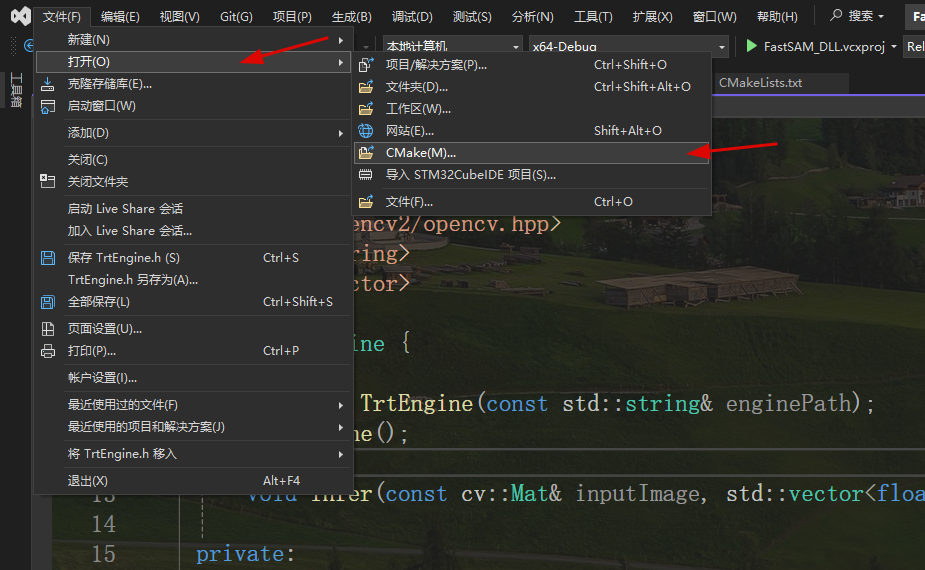
项目打开后如下图所示: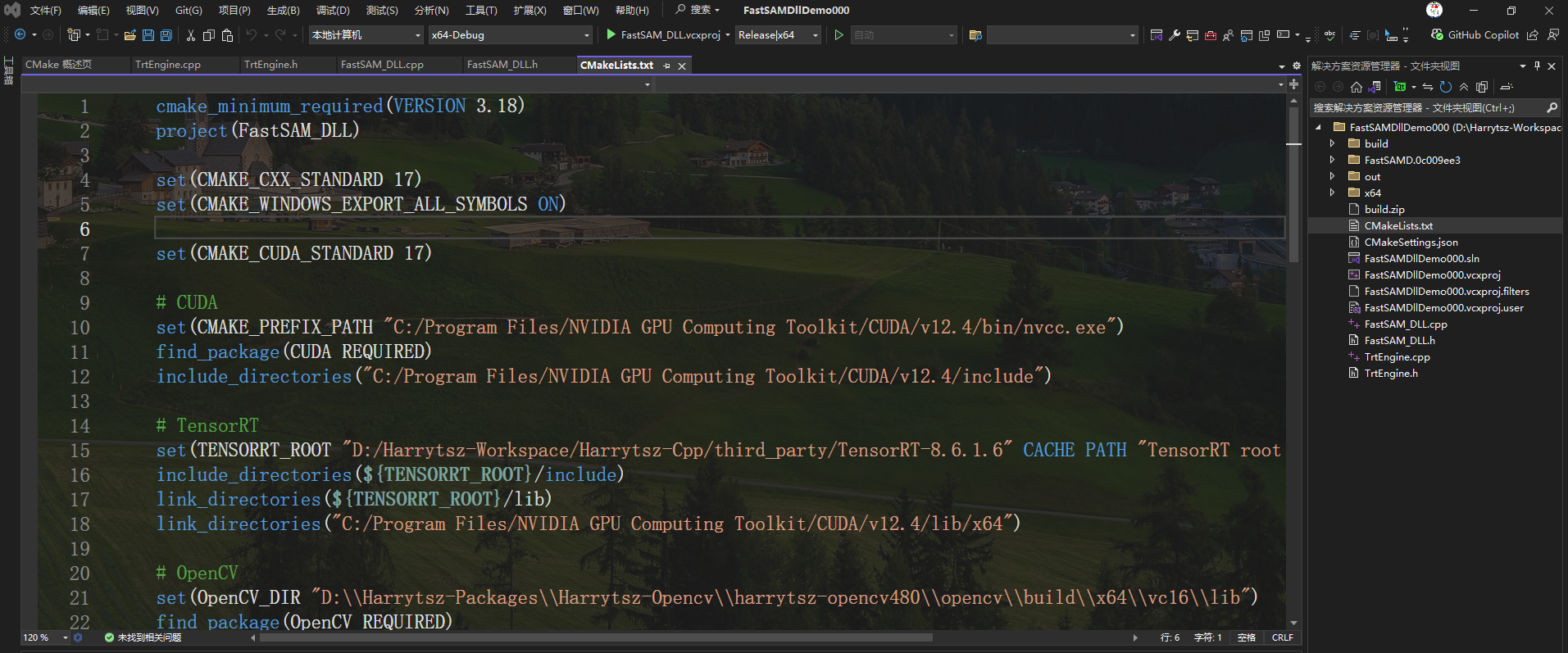
VS2022 选项框中选择 FastSAM_DLL.vcxproj -> Release|x64
配置好后,点击绿色三角形即可执行: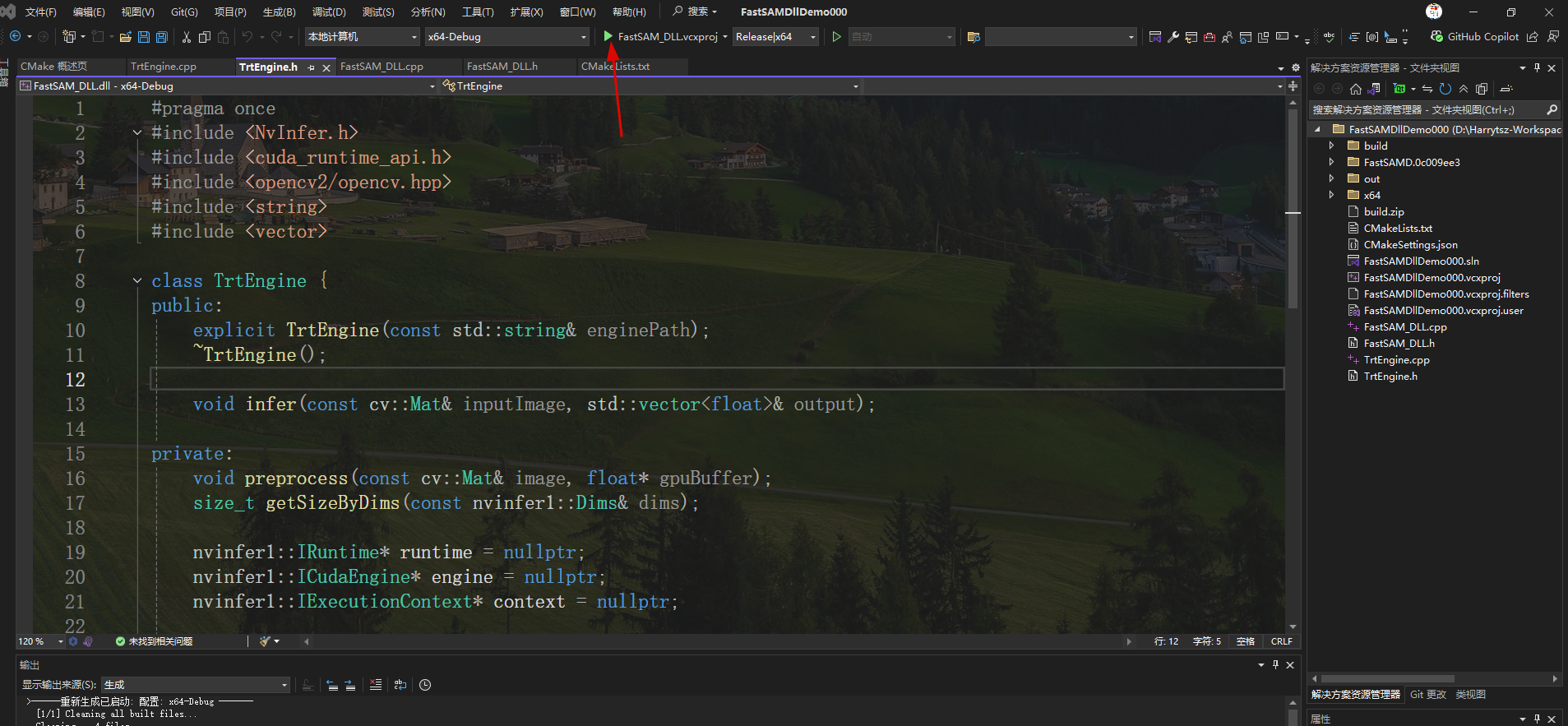
即可在对应文件下生成 FastSAM_DLL.dll 文件
或者使用 CMD 命令行来执行 CMake,在 CMakeLists.txt 文件路径下打开 CMD 命令行
cmake -S . -B build
cmake --build build --config Release
执行成功后也能生成 FastSAM_DLL.dll 文件
3、C# 调用
使用 VS2022 创建 C# 控制台项目
创建 FastSAMNative.cs 文件
using System;
using System.Collections.Generic;
using System.Linq;
using System.Runtime.InteropServices;
using System.Text;
using System.Threading.Tasks;

namespace FastSAM_Console
{
    internal class FastSAMNative
    {
        private const string DLL_NAME = "FastSAM_DLL.dll";

        [DllImport(DLL_NAME, CallingConvention = CallingConvention.Cdecl, CharSet = CharSet.Ansi)]
        public static extern IntPtr InitializeEngine(string enginePath);

        [DllImport(DLL_NAME, CallingConvention = CallingConvention.Cdecl)]
        public static extern int Detect(
            IntPtr engineHandle,
            byte[] imageData,
            int width,
            int height,
            int channels,
            [Out] float[] outputBuffer,
            ref int outputSize
         );

        [DllImport(DLL_NAME, CallingConvention = CallingConvention.Cdecl)]
        public static extern void ReleaseEngine(IntPtr engineHandle);

        [DllImport(DLL_NAME, CallingConvention = CallingConvention.Cdecl)]
        public static extern IntPtr GetFastSAMError();

        public static string GetError()
        {
            try
            {
                IntPtr errorPtr = GetFastSAMError();
                return Marshal.PtrToStringAnsi(errorPtr) ?? "Unknown error";
            }
            catch
            {
                return "Failed to get error message";
            }
        }
    }
}
修改默认生成 Program.cs 文件内容:
using System;
using System.Collections.Generic;
using System.Drawing;
using System.Drawing.Imaging;
using System.IO;
using System.Runtime.InteropServices;
using FastSAM_Console;

class Program
{
    private const int MaxOutputSize = 1000000;

    static void Main(string[] args)
    {
        Console.WriteLine("================================================");
        Console.WriteLine("    FastSAM TensorRT 推理控制台程序");
        Console.WriteLine("================================================");
        Console.WriteLine();

        // 解析命令行参数
        if (args.Length < 2)
        {
            Console.WriteLine("使用方法:");
            Console.WriteLine("  FastSAM_Console.exe <engine路径> <图片路径> [输出图片路径]");
            Console.WriteLine();
            Console.WriteLine("示例:");
            Console.WriteLine("  FastSAM_Console.exe FastSAM-x.engine cat.jpg result.jpg");
            Console.WriteLine();
            Console.WriteLine("按任意键退出...");
            Console.ReadKey();
            return;
        }

        //string enginePath = args[0];
        //string imagePath = args[1];
        //string outputPath = args.Length >= 3 ? args[2] : null;
        string enginePath = "FastSAM-x.engine";
        string imagePath = "./cat.jpg";
        string outputPath = "./result.jpg";

        // 验证文件存在
        if (!File.Exists(enginePath))
        {
            Console.WriteLine($"[错误] 引擎文件不存在: {enginePath}");
            return;
        }

        if (!File.Exists(imagePath))
        {
            Console.WriteLine($"[错误] 图片文件不存在: {imagePath}");
            return;
        }

        // 1. 初始化引擎
        Console.Write($"[步骤1/4] 正在加载引擎 '{Path.GetFileName(enginePath)}'... ");
        IntPtr engineHandle = FastSAMNative.InitializeEngine(enginePath);
        if (engineHandle == IntPtr.Zero)
        {
            Console.WriteLine("失败!");
            Console.WriteLine($"[错误] {FastSAMNative.GetError()}");
            return;
        }
        Console.WriteLine("成功!");

        // 2. 加载图像
        Console.Write($"[步骤2/4] 正在加载图片 '{Path.GetFileName(imagePath)}'... ");
        Bitmap bitmap;
        try
        {
            bitmap = new Bitmap(imagePath);
            Console.WriteLine($"成功! ({bitmap.Width}x{bitmap.Height})");
        }
        catch (Exception ex)
        {
            Console.WriteLine($"失败!");
            Console.WriteLine($"[错误] {ex.Message}");
            FastSAMNative.ReleaseEngine(engineHandle);
            return;
        }

        // 3. 执行推理
        Console.Write($"[步骤3/4] 正在执行推理... ");
        float[] outputBuffer = new float[MaxOutputSize];
        int outputSize = MaxOutputSize;

        // 转换图像
        byte[] imageData = GetBGRBytes(bitmap);

        var sw = System.Diagnostics.Stopwatch.StartNew();
        int result = FastSAMNative.Detect(
            engineHandle,
            imageData,
            bitmap.Width,
            bitmap.Height,
            3,
            outputBuffer,
            ref outputSize
        );
        sw.Stop();

        if (result != 0)
        {
            Console.WriteLine($"失败!");
            Console.WriteLine($"[错误] {FastSAMNative.GetError()}");
            bitmap.Dispose();
            FastSAMNative.ReleaseEngine(engineHandle);
            return;
        }

        Console.WriteLine($"成功! ({sw.ElapsedMilliseconds} ms)");
        Console.WriteLine($"[信息] 输出大小: {outputSize} 个浮点数");

        // 4. 后处理与保存
        Console.Write($"[步骤4/4] 正在处理结果... ");
        var detections = ParseDetections(outputBuffer, outputSize);
        Console.WriteLine($"检测到 {detections.Count} 个对象");

        // 显示检测结果
        if (detections.Count > 0)
        {
            Console.WriteLine();
            Console.WriteLine("检测结果:");
            Console.WriteLine("----------------------------------------");
            Console.WriteLine($"{"序号",-4} {"置信度",-10} {"X",-8} {"Y",-8} {"宽度",-8} {"高度",-8}");
            Console.WriteLine("----------------------------------------");
            for (int i = 0; i < detections.Count; i++)
            {
                var det = detections[i];
                Console.WriteLine($"{i + 1,-4} {det.Confidence,-10:F3} {det.X,-8:F1} {det.Y,-8:F1} {det.Width,-8:F1} {det.Height,-8:F1}");
            }
            Console.WriteLine();
        }

        // 保存结果图片
        if (!string.IsNullOrEmpty(outputPath))
        {
            Console.Write($"正在保存结果图片 '{Path.GetFileName(outputPath)}'... ");
            try
            {
                Bitmap resultBitmap = DrawDetections(bitmap, detections);
                resultBitmap.Save(outputPath, ImageFormat.Jpeg);
                resultBitmap.Dispose();
                Console.WriteLine("成功!");
            }
            catch (Exception ex)
            {
                Console.WriteLine($"失败: {ex.Message}");
            }
        }

        // 清理
        bitmap.Dispose();
        FastSAMNative.ReleaseEngine(engineHandle);

        Console.WriteLine();
        Console.WriteLine("推理完成! 按任意键退出...");
        Console.ReadKey();
    }

    // 辅助方法:Bitmap 转 BGR 字节数组
    static byte[] GetBGRBytes(Bitmap bitmap)
    {
        var rect = new Rectangle(0, 0, bitmap.Width, bitmap.Height);
        var bitmapData = bitmap.LockBits(rect, ImageLockMode.ReadOnly, PixelFormat.Format24bppRgb);

        int bytes = bitmapData.Stride * bitmapData.Height;
        byte[] rgbValues = new byte[bytes];

        Marshal.Copy(bitmapData.Scan0, rgbValues, 0, bytes);
        bitmap.UnlockBits(bitmapData);

        return rgbValues;
    }

    // 解析检测框
    static List<Detection> ParseDetections(float[] buffer, int size)
    {
        var detections = new List<Detection>();
        const int OutputStride = 38;  // [x, y, w, h, conf, cls, mask_coeffs(32)]
        const float ConfThreshold = 0.9f;

        for (int i = 0; i < size / OutputStride; i++)
        {
            float confidence = buffer[i * OutputStride + 4];
            if (confidence < ConfThreshold) continue;

            detections.Add(new Detection
            {
                X = buffer[i * OutputStride],
                Y = buffer[i * OutputStride + 1],
                Width = buffer[i * OutputStride + 2],
                Height = buffer[i * OutputStride + 3],
                Confidence = confidence,
                ClassId = (int)buffer[i * OutputStride + 5]
            });
        }
        return detections;
    }

    // 绘制检测框
    static Bitmap DrawDetections(Bitmap input, List<Detection> detections)
    {
        Bitmap result = new Bitmap(input);
        using (var g = Graphics.FromImage(result))
        {
            using (var pen = new Pen(Color.Lime, 2))
            using (var font = new Font("Consolas", 10, FontStyle.Bold))
            using (var brush = new SolidBrush(Color.Lime))
            {
                foreach (var det in detections)
                {
                    // 缩放坐标到图像尺寸
                    int x = (int)(det.X * result.Width / 640);
                    int y = (int)(det.Y * result.Height / 640);
                    int w = (int)(det.Width * result.Width / 640);
                    int h = (int)(det.Height * result.Height / 640);

                    var rect = new Rectangle(x - w / 2, y - h / 2, w, h);
                    g.DrawRectangle(pen, rect);

                    string label = $"Object {det.Confidence:F2}";
                    g.DrawString(label, font, brush, rect.X, rect.Y - 18);
                }
            }
        }
        return result;
    }
}

// 检测数据结构
class Detection
{
    public float X, Y, Width, Height;
    public float Confidence;
    public int ClassId;
}
F5 执行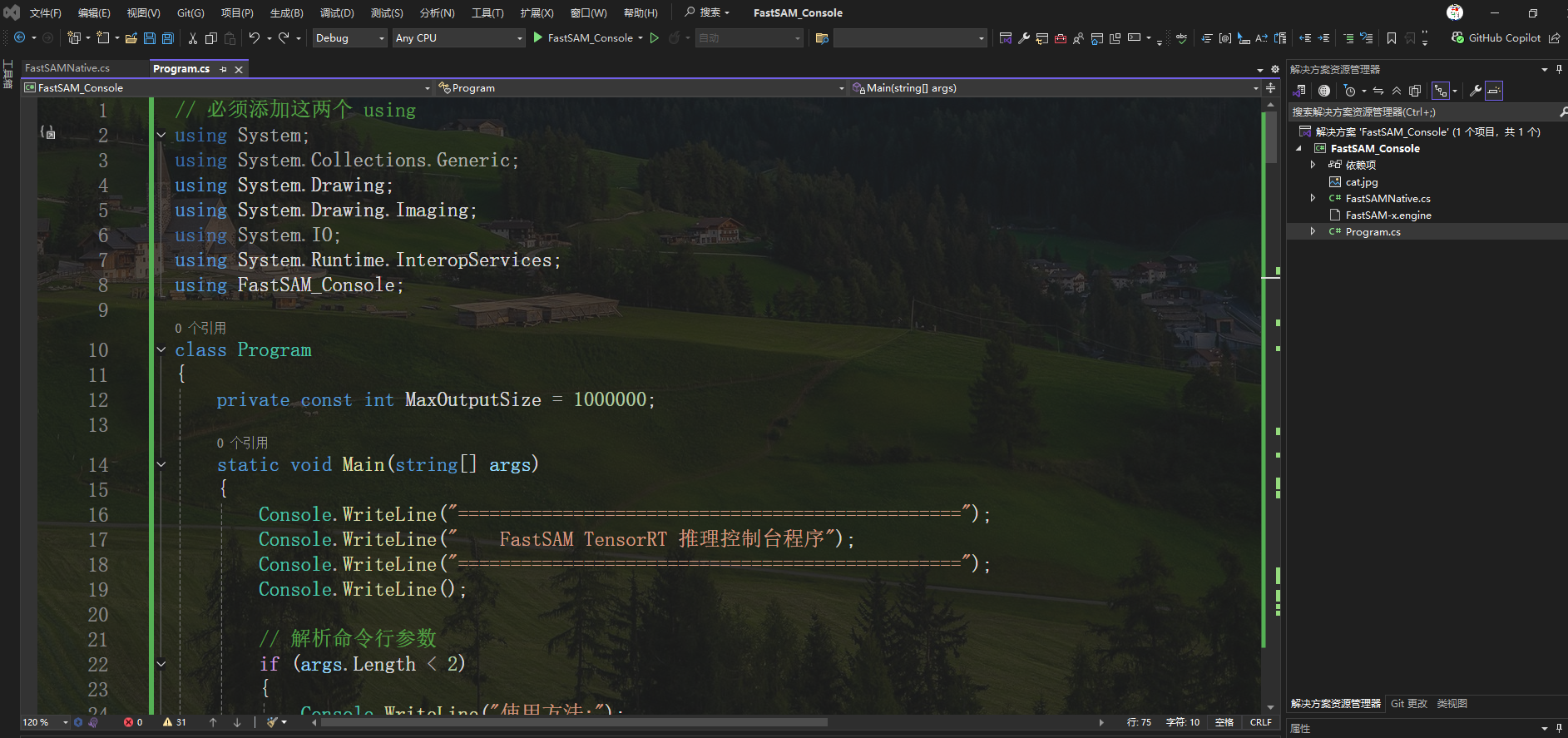
在对应路径下找到 FastSAM_Console.exe
D:\Harrytsz-Workspace\Harrytsz-CSharp\FastSAM_Console\bin\Debug\net8.0
- 拷贝第 1 步转换成功的 TensorRT FastSAM-x.engine 以及测试图片 cat.jpg 拷贝到当前路径:
- 将第 2 步生成的 C++ dll 文件拷贝到当前路径下:
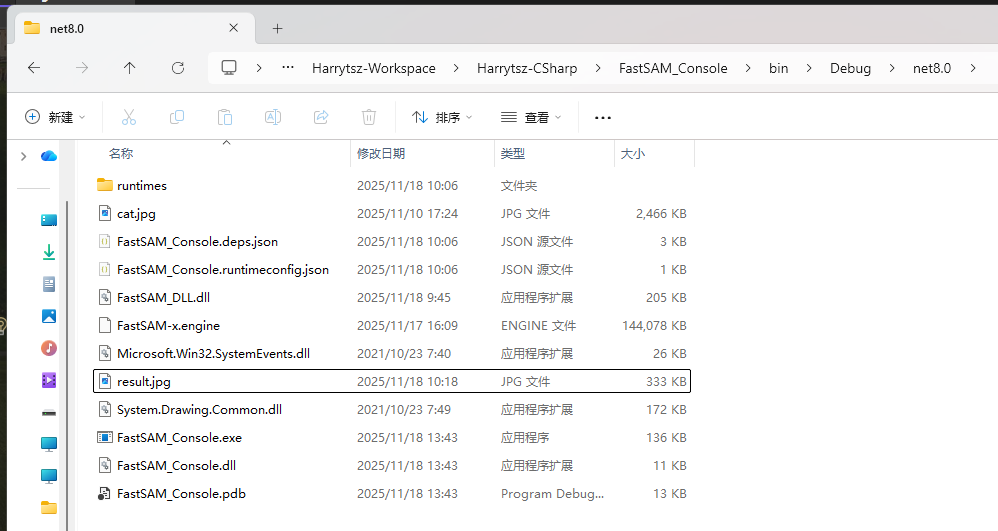
在当前路径下开启 cmd 命令行窗口,并执行:
FastSAM_Console.exe FastSAM-x.engine cat.jpg result.jpg
FastSAM 检测结果会保存到 result.jpg 图片中